The problem
They opened it. They liked it. They didn't buy.
You paid for the list, the design and the discount. Then “maybe later” spent it all, because nothing in the email said now.
An inbox: your sale email, opened on Monday and left for later, sinks under newer email every day until the sale ends unbought.
What you've tried
- “Ends Friday!” in the subject lineRead once, at the open. By the time they're ready, it's three emails down.
- Another reminder emailOne more send, a few more unsubscribes, and the same “later”.
- A deeper discountLess margin on every order, and still no reason to buy today.
It's not your offer. Nothing in the email says now.A countdown does, and Flash Render keeps flashtimer's accurate to the second, however late they come back.
In the inbox
See it in a real campaign.
Three emails every store sends, each with a live countdown rendered by flashtimer as you read. Open one, or switch to mobile to see it the way most of your readers will.
Inbox
Northward
Black Friday
Black Friday: 40% off everything we make
Brew Theory Roasters
Flash sale
24 hours. 30% off every bag.
Atelier Nova
Abandoned cart
We're holding your bag for you
Black Friday: 40% off everything we make
Northward <news@northward.co>
to me
Today
NORTHWARD
JacketsLayersGear

Our only sale of the year
40% off everything we make.
Jackets, parkas, fleece and the rest of the range. The prices hold until the clock below runs out, and not a minute longer.
 Shop Black Friday
Summit down jacket
Rated to minus 25
$168$280

Ridge parka
Knee length, storm hood
$204$340
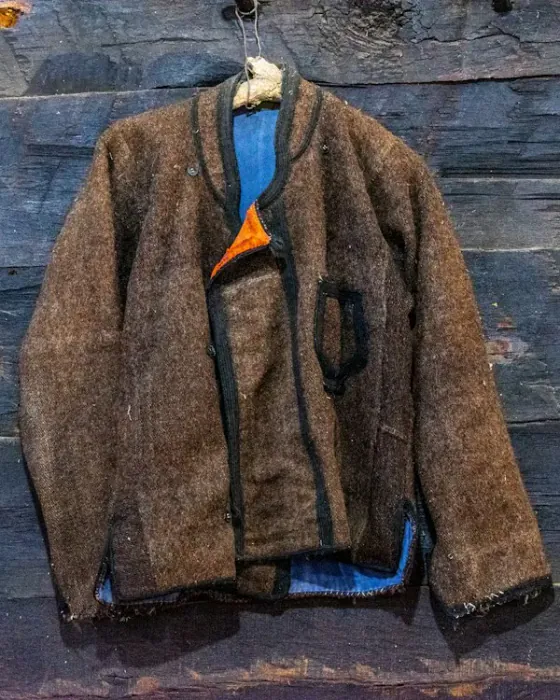
Bothy wool jacket
Boiled wool, cut for layering
$114$190

Storm shell
Fully taped seams
$132$220
Repairs for lifeon everything we make
Free returnsuntil the end of January
Northward
401 Spruce Wharf, Portland, Maine
You're getting this because you have a Northward account.
UnsubscribeEmail preferencesView in browser
This email uses
Synced with your store's discountAvailable on Pro
Brands, people and addresses in these examples are fictional. The timers are real, rendered by flashtimer.
Browse every exampleHow it works
Live in your next email, in about a minute.
No code, no plugin, no designer. If your email can show an image, it can show a countdown.
A prompt, “Black Friday sale ending Friday at midnight, our brand colours, urgent tone”, turned into a countdown timer ready to use.
Step 1
Describe your sale. AI designs it.
Tell it the deal and the deadline; it picks the colours, layout and copy, and matches your logo. Prefer to do it yourself? The editor takes a minute.
The timer’s image link, copied, or the timer added to the Black Friday campaign in Mailchimp.
Step 2
Copy one link, or let us put it in.
No code, no plugin, no developer: paste one image link anywhere. Or connect Klaviyo, Mailchimp, HubSpot and more (Pro and up), pick a campaign, and flashtimer puts the timer in for you.
Northward’s email, “Black Friday: 40% off everything we make”, with its live countdown timer, which shows an ended message once the sale is over.
Step 3
It counts down in every inbox.
Any campaign, flow or template. Each reader sees the real time left, in their language, and when the sale ends it shows your “offer ended” message instead of 00:00:00.
Works with
- Klaviyo
- Shopify
- Mailchimp
- HubSpot
- Omnisend
- ActiveCampaign
- Brevo
- MailerLite
and anywhere an email can hold an image. See every integration
Your first timer takes about a minute. No card.
Prefer to watch? The two-minute tour
Why flashtimer
The countdown, rebuilt for how you sell now.
Other timer tools stop at drawing a clock. flashtimer builds it from a sentence, puts it in your campaign, gives every reader their own deadline and tells you which version sold more.
- $0
- To start
- Three timers and 20,000 views a month on the free plan, no card.
- 1 min
- To your first timer
- Describe it or design it, then paste one link or put it in your campaign.
- Live
- Flash Render
- Our own engine draws each countdown at every open, never from a cached copy.
- Auto
- Each reader's language
- Labels follow every reader's language, from your email platform's field.
| Capability | flashtimer | Most timer tools |
|---|---|---|
| Included | Cached, 1 min+ | |
Why it matters:There's no stored copy to be behind. A reader who opens at 11:58 sees two minutes left, not a picture from 11:56, and the image is sent no-store, so Gmail and Apple Mail are told never to keep an old one. | ||
| Included | Not offered | |
Why it matters:A finished timer in seconds, without a designer or a hunt through templates. | ||
| Included | Not offered | |
Why it matters:Your AI assistant builds, schedules and reports on timers from the chat you already work in. | ||
| Included | Rare | |
Why it matters:Know which timer sells more, not just which one you like more. | ||
| Included | Sometimes | |
Why it matters:Timers that look designed into your emails, not pasted on top of them. | ||
| Included | Usually | |
Why it matters:Welcome flows and abandoned carts get a real deadline for every reader. | ||
| Included | Usually | |
Why it matters:Nobody who opens late sees 00:00:00: they see your next offer instead. | ||
| Included | Sometimes | |
Why it matters:Timers that follow your promotions without anyone copying dates by hand. | ||
| Included | Often | |
Why it matters:Try it on a real campaign before you pay anything. | ||
"Most timer tools" is our reading of the public feature lists of the leading email countdown services as of launch; it is a generalisation, not a review of any one product. Compare with a specific tool
AI-native
Describe the sale. flashtimer builds the timer.
In the dashboard, one sentence becomes a scheduled timer in your brand's colours, and changes work the same way: attach your logo and the colours come from it. Or hand the whole job to the AI assistant you already use.
From your AI assistant
Give your AI assistant the job.
Connect flashtimer once and ask from the chat you already work in. It makes the timer, puts it in your campaign once you say yes, extends the sale when it's going well, and tells you how it did.
- Uses design_timer.
- Uses preview_campaign_embed then embed_timer_in_campaign, after you allow it.
- Uses update_timer.
- Uses get_analytics.
Works in Claude, ChatGPT, Gemini, Grok and any other MCP client. Available on Pro and up.
Everything a timer needs
Built for the inbox.
Email is a hostile place for anything live. These are the parts that make a countdown work there, and keep working after the sale ends.

Renders everywhere
Every inbox, before and after the deadline.
A GIF works wherever images do, and ours uses Flash Render: each time an inbox asks for it, our own engine draws it there and then, never from a cached copy. When the sale ends it shows your message or your own fallback image, and on Pro and up you can give Apple Mail's early fetch a message instead.

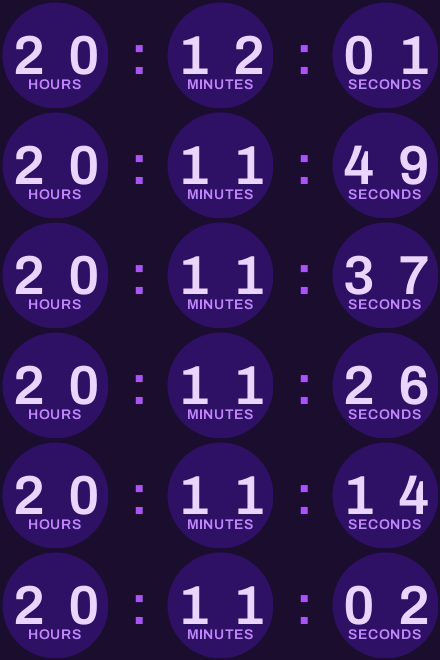

Your brand, exactly
Every layout you need, in your fonts and colours.
Pills, boxes, circles, rings and more. Upload your fonts, save a brand kit, and drop the background entirely so the timer sits on your email's own.
Custom branded timers →Evergreen
A deadline per reader, or per send.
Start the countdown at each reader's first open, or at the send with a signed link that can't be tampered with. Welcome flows and abandoned carts get a real deadline.
Evergreen countdown timers →- English
- French
- Spanish
- German
- Italian
- Portuguese
- Dutch
International
In each reader's language.
Set the labels' language, or leave it on auto: add your email platform's language field and each reader gets their own. The deadline is set in your store's time zone and holds everywhere.
Multilingual countdown timers →Measure and test
Know what the timer did.
Views by device, client and country. Click-tracked links. A/B tests between two timers, and weekly AI insights that say what to change next.
A/B test your timers →Automate it
Timers that follow your promotions.
Sync deadlines from your Shopify, WooCommerce or BigCommerce discounts. Fire Zapier, Make or Slack when a timer expires. Or script all of it with the REST API.
All integrations →Swipe for more
Pricing
Start free. Pay when the timers pay for themselves.
Every plan starts free, with no card. Upgrade by 26 November, 23:59 UTC and the Black Friday launch kit adds a month of views to your first paid plan, free. Code FLASH20 takes 20% off your first 3 months on top.
Black Friday launch kit closes on 26 November 2026, 23:59 UTC
Swipe to compare plans
Prices exclude tax. Tax is calculated from your billing address and added at checkout.
Does it pay for itself?
One extra order pays for 6 months of Basic.
Basic is $9 a month. One reader who buys because the clock was running is all it takes.
Nothing to lose
- Free plan, no card, no time limitThree timers and 20,000 views a month, for as long as you like.
- Upgrade only when a timer is earningPaid plans add AI, evergreen deadlines and integrations when you need them.
- Cancel any timeYou keep your plan to the end of the period you paid for, then drop to Free.
- The Reserve's views never expireLaunch kitThe Black Friday Reserve goes into your top-up credit, used once a month's own views run out. Cancel and it stays yours.
Questions